
In almost every family, there's someone who thinks of everything. The boiler before winter, the chimney sweep, the car inspection, the passport that expires the year of the big trip. It's rarely said. It's almost always true.
Since October 31, that person has an ally: TimeAcappella, our new app, is available on Mac, Windows PC, and Android. It remembers these things for you, tells you when it's time, and finally lets you share the list with your loved ones. It's free on one device, with no ads.
iPhone and iPad: coming soon. The app is currently under review by Apple, which checks every app before publishing it. It will arrive on the App Store as soon as Apple approves it.
Things with no date, until the day they're urgent
The roof to clean every two years. The boiler to have serviced before winter. The car to take in for maintenance, then the inspection. None of it has a date: it comes back "every two years," "before winter," "a year after last time." That's exactly what no calendar knows how to remember.
So we think about it in the evening, in the car, at the wrong moment. We tell ourselves we'll need to call, we forget, we think of it again. And one day, it's no longer "soon": the heating technician has no openings before January, the passport won't be ready in time for the trip. We find out too late, and scramble to catch up.
Write it down once, TimeAcappella remembers
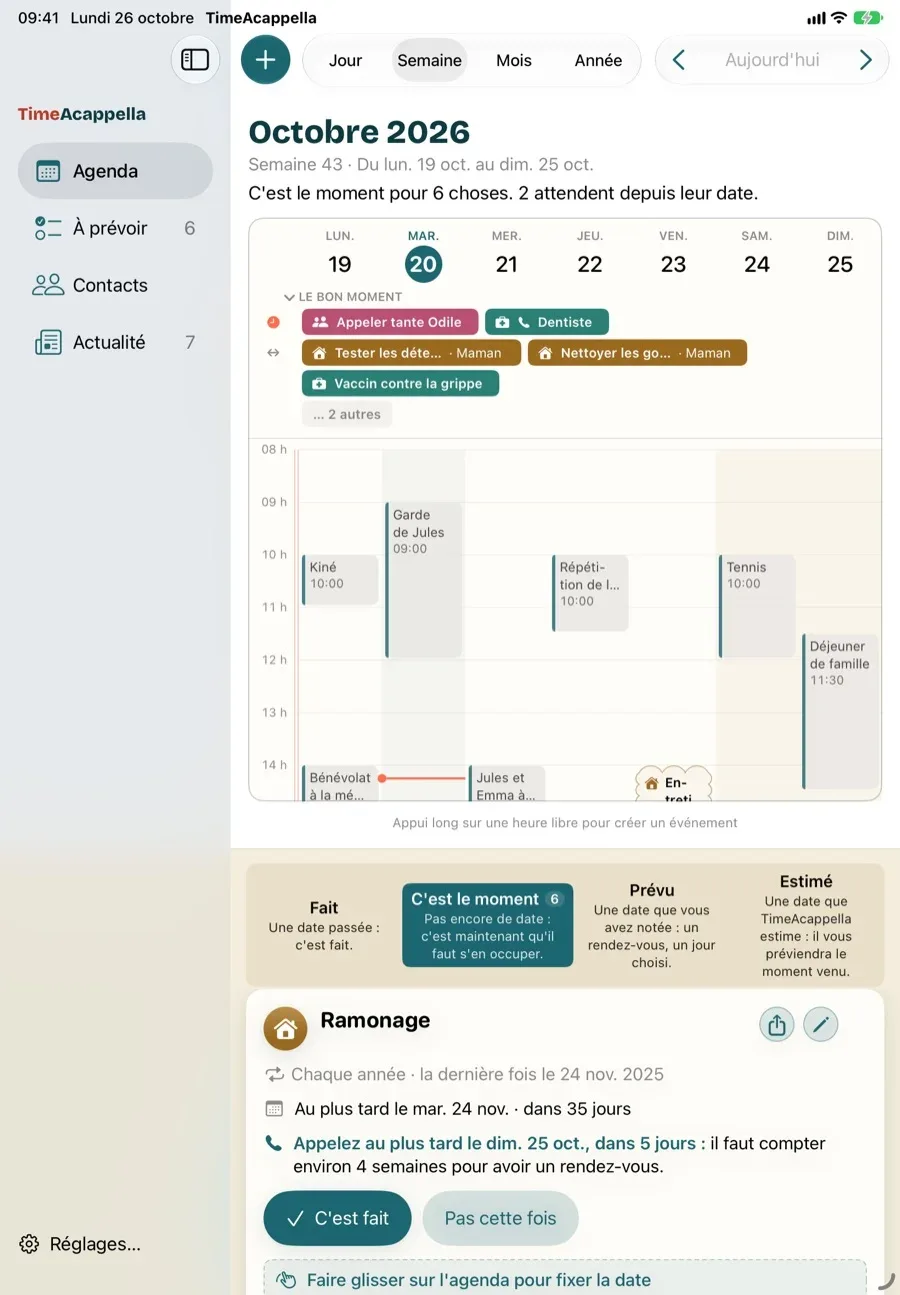
TimeAcappella doesn't replace your calendar: your calendar handles what has a date, TimeAcappella handles the rest. It all happens in three steps.
- You write it down once. Pick from the list: boiler servicing, chimney sweeping, car maintenance, passport… TimeAcappella already knows how often they come around. Tell it when the last time was, and it counts from there. Something all your own? Type it in, and it remembers that too.
- It tells you when it's time. For an appointment, it even tells you when to call, factoring in the usual wait: for a chimney sweep in the fall, plan on about a month.
- You fit it into your week. If you like, your Google or Apple calendar appears next to what's waiting. Choose the day, note the appointment you booked: it goes into your calendar, alongside the rest. One click on "Done," and the next time is already counted.
And it's not just for you: add Mom, Dad, or a child, and each item shows who it's for. Mom's boiler no longer gets mixed up with yours.
Which devices, and how much?
TimeAcappella is a free download:
- Mac: Macs from 2018 and later, running macOS 14 or later.
- Windows PC: Windows 11, or Windows 10 updated since 2020.
- Android: phones and tablets from 2019 and later, running Android 9 or later, on Google Play.
- iPhone and iPad: coming soon, as soon as Apple approves it.
| Plan | Price | What it includes |
|---|---|---|
| Free | €0 | Your things to plan for (up to 30 active), their reminders, and your calendar, on one device, without backup. |
| Solo | €39 per year | Unlimited things to plan for, and your notebook backed up, the same across your devices (up to three). |
| Family | €49 per year | Everything in Solo, for up to five people, each with their own account, and eight devices, plus unlimited sharing. |
Reminders are never paid. No monthly plan: one yearly price, available on the website, in the desktop app, or through Google Play on Android. And the people you share something with pay nothing.
We make our living from these subscriptions, and nothing else: no ads, no tracking, nothing you write down is ever sold. With Solo or Family, your notebook is stored safely with us, in Europe: we don't look at it, and we don't show it to anyone.
The app and its website are available in French and English. Suggestions and everything you write down work anywhere; appointment wait times are, for now, those of France.
Why Intuisphere is making a calendar
You know us for WebAcappella, and it's a fair question: what is a website creation software publisher doing with boilers and passports? The answer lies under its founder's roof.
At our house, the roof, the alarm, and the car are my department. And I always found out about them too late. For 21 years, I've been making software that automates tedious things: WebAcappella helps thousands of people build their websites. So I made TimeAcappella.

You probably recognized Octave: the WebAcappella mascot has taken on TimeAcappella's coral color, and a new job. To remember everything, eight arms is not too many.
TimeAcappella is a product in its own right, supported by its own subscriptions. It changes nothing for WebAcappella: Fusion and Tempo continue on their way.
The one who remembers is no longer alone
This is the heart of TimeAcappella. With the Family plan, share something with a loved one: "Share…", a first name, and TimeAcappella prepares the message. You send it as usual, by text, WhatsApp, or email: "Can you clean the gutters at Mom's? Let me know here when it's done."
The day it's done, your sister opens the link and checks "Done." No app, no account, no password. You know right away, and TimeAcappella is already counting toward the next time. If she wants the reminders too, she installs the app, free to download: the item shows up there, with its reminders.
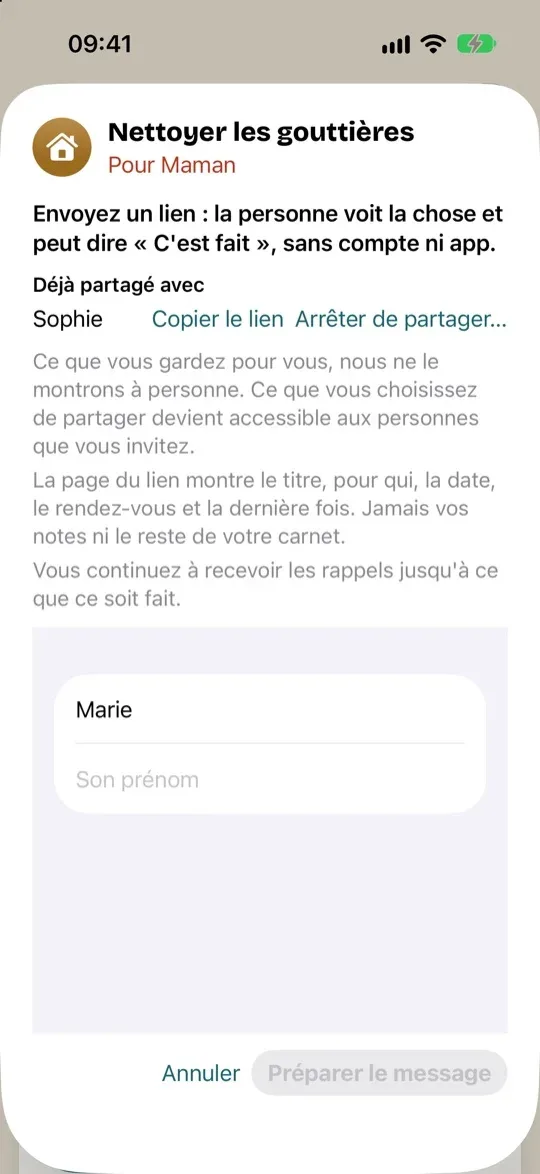
Everyone keeps their own department. No one forgets anyone else's anymore.
TimeAcappella is fresh out of the workshop. A question, a bug, an idea? Write to us at contact@intuisphere.com: a real person will answer.
Free on one device, with no ads. On Mac, Windows PC, and Android, and coming soon to iPhone and iPad.
Download TimeAcappella